
Download Picturehill – wallpaper, daily wallpaper, automatic wallpaper changer, desktop background, image source, Bing, NASA, National Geographic, high-quality images, visual inspiration, desktop refresh, automated wallpaper
Overview
Picturehill is a productivity-focused mobile application designed for users who seek regular visual refreshment through high-quality desktop wallpapers. The app functions as an automated wallpaper management tool, pulling daily images from reputable sources such as Bing, NASA, and National Geographic. Its core purpose is to eliminate the manual effort required to update desktop backgrounds, offering a seamless, hands-off experience for users who value aesthetic variety and inspiration.
Target users include digital creatives, remote workers, and tech enthusiasts who use their devices for both work and leisure. The app caters to individuals who appreciate visually rich environments and want to maintain a dynamic desktop experience without constant intervention. By sourcing images from trusted platforms, Picturehill ensures that users are consistently exposed to professionally curated, high-resolution visuals.
Although the developer did not provide additional technical details about the company’s background, the app has been available since 2012, indicating a long-standing presence in the mobile productivity space. This longevity suggests reliability and consistent functionality over time. Picturehill plays a meaningful role in the mobile utility ecosystem by simplifying a common user task—wallpaper management—while enhancing the overall digital environment with daily visual stimuli.
Key Features & Functionality
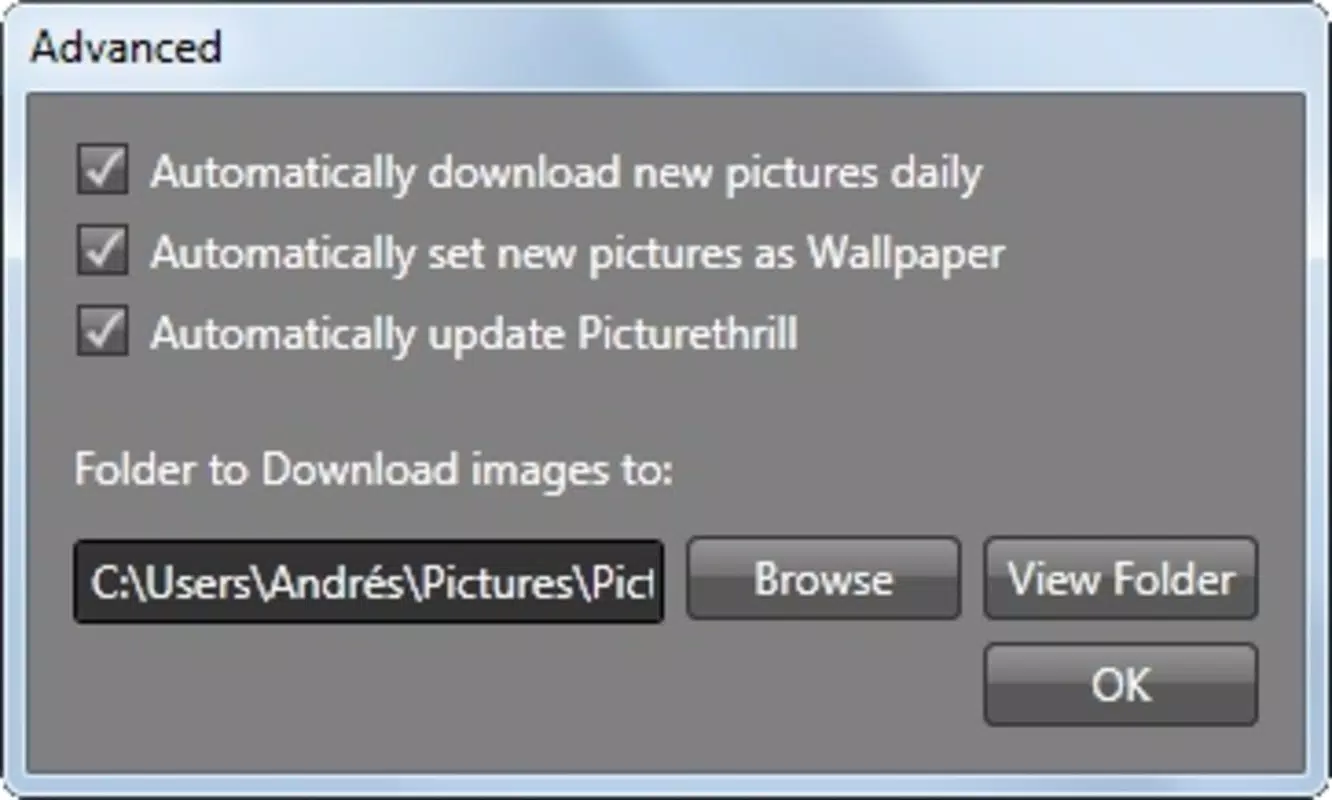
- Daily Image Downloads: Picturehill automatically fetches a new wallpaper each day from selected sources, ensuring a constant stream of fresh, high-quality visuals. This feature is ideal for users who want their desktop to reflect changing themes or seasonal moods without manual input.
- Automatic Wallpaper Change: The app applies new wallpapers at scheduled intervals, allowing for a dynamic desktop experience. Users can also trigger updates manually with a single click, giving them full control over timing and frequency.
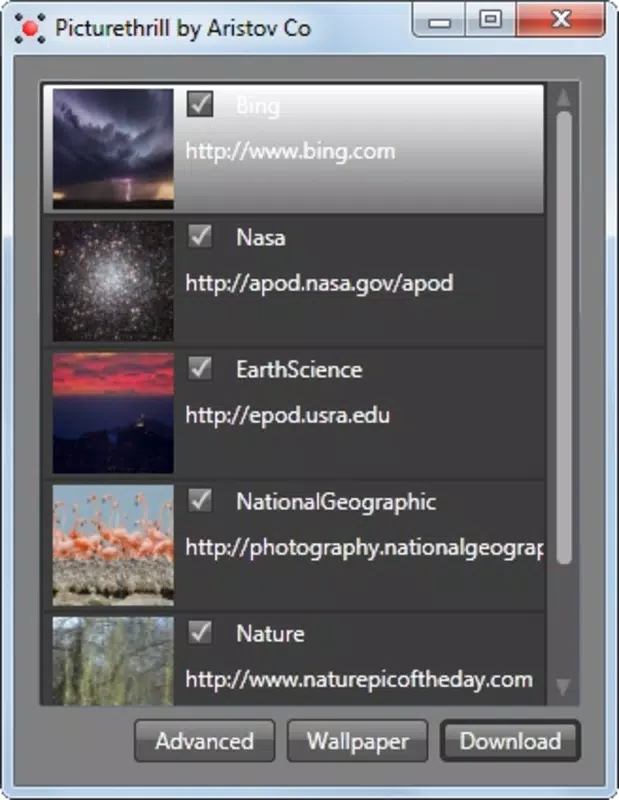
- Custom Source Selection: Users can choose which image sources to include—such as Bing, NASA, or National Geographic—enabling a personalized content feed. This flexibility ensures that users only receive images aligned with their interests.
- Organized Image Storage: All downloaded wallpapers are saved in a dedicated folder, making it easy to access and reuse them outside the app. This feature supports both convenience and digital organization.
- User-Friendly Interface: The app features a clean, intuitive design that requires no technical expertise. Navigation is straightforward, allowing users to adjust settings and view current wallpapers with minimal effort.
For example, a remote worker might use Picturehill to display a new NASA space image each morning, creating a sense of wonder and motivation. Similarly, a photographer could use the app to explore National Geographic’s nature photography, using the stored images for personal inspiration or reference.
Interface, UX & Performance
Picturehill presents a minimalistic and functional interface, optimized for ease of use across various screen sizes. The layout is clean, with clearly labeled options and a logical flow between settings and image previews. Users can quickly access source preferences, update schedules, and the stored image library without confusion.
Navigation is intuitive, relying on standard touch gestures and button placement that align with Android’s design principles. The app responds promptly to user inputs, with no noticeable lag during setup or image loading. Although the developer did not list formal performance metrics, the app’s lightweight size of 1.2 MB suggests efficient resource usage, making it suitable for older or mid-range devices.
Stability appears consistent, as the app has maintained functionality since its initial release in 2012. Users can expect smooth operation during daily updates and manual triggers. The app does not display excessive battery consumption or background activity, which is essential for a utility tool that runs periodically.
Platform Compatibility & Technical Requirements
Picturehill is available exclusively on the Android platform. The current version is 2.1.1, with a file size of 1.2 MB, indicating a lightweight footprint. This makes it accessible even on devices with limited storage capacity.
The developer did not specify minimum OS requirements or compatibility details for specific Android versions. However, given the app’s long-standing release history and small size, it is likely compatible with a wide range of Android devices, including older models. Users should ensure their device meets standard Android functionality requirements to support background downloads and wallpaper changes.
Pros and Cons
Pros
- Automatically updates desktop wallpaper daily from trusted sources
- Supports customization of preferred image sources
- Organizes downloaded images in a dedicated folder for easy access
- Simple, intuitive interface suitable for all user levels
- Lightweight size (1.2 MB) with minimal system impact
Cons
- Developer did not provide detailed technical specifications or OS compatibility
- App availability is limited to Android only
- No visible update frequency or change history within the app
- Customization options may be limited compared to newer alternatives
- No integration with cloud storage or cross-device sync
FAQ
Is Picturehill safe to install on Android devices?
Yes, the app is free and available through official Android channels. As a lightweight utility, it does not require excessive permissions and operates within standard system boundaries.
Can I use Picturehill on iOS devices?
Currently, the app is only available for Android. There is no official iOS version listed by the developer.
How often does Picturehill update the wallpaper?
The app updates the wallpaper daily by default. Users can also trigger updates manually at any time.
Does Picturehill require internet access?
Yes, an active internet connection is required to download new wallpapers from external sources such as Bing, NASA, and National Geographic.
Can I save or reuse downloaded wallpapers?
Yes, all images are stored in a dedicated folder on the device, allowing users to access and use them outside the app.
Final Thoughts
Picturehill remains a reliable, no-frills solution for users seeking daily visual refreshment through automated wallpaper changes. Its focus on simplicity, source customization, and organized storage makes it a valuable tool for anyone who values a dynamic desktop environment. While it lacks modern features like cloud sync or advanced scheduling, its core functionality is solid and efficient.
For long-time Android users who appreciate consistent performance and minimal system impact, Picturehill delivers real value. It’s particularly beneficial for those who enjoy space photography, nature visuals, or curated digital art without the need for complex setups.
Download Picturehill now


